
TaleWave
TaleWaveBooks & Reference
3.078.00 Reviews
- Version
- 1.1.26
- Installs
- 10.00K
- Age Rating
- Teen
Screenshots
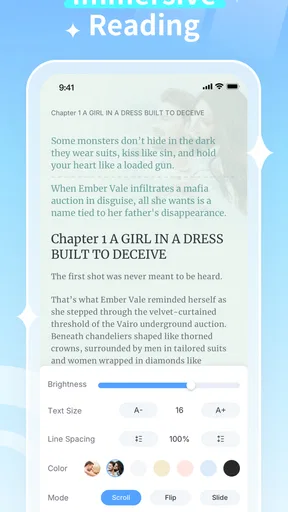
Our Review of TaleWave
 Analysis by Appyee
On a shared tablet, a reading app can quickly become part of the household routine: one person wants a quiet chapter, another is curious about writing, and someone else just wants to browse. I’d approach TaleWave as a story-focused space that can suit those different interests, while keeping in mind that shared access calls for a little coordination. It is a free Books & Reference app from TaleWave, with in-app purchases ranging from $0.49 to $279.99 per item, so I’d also agree on spending expectations before anyone explores it.
Making room for different reading habits
A realistic use for TaleWave is a short reading break during a shared-device handoff. One person can browse stories and save a title to continue later, while another can use a separate stretch of time to work on a draft. That kind of turn-taking is more practical than treating the app as a family library where everyone’s activity automatically stays distinct. I would decide who is using the device and when, especially if readers have very different tastes or writing plans.
Its mix of reading and writing gives it a broader role than a basic e-book reader, but it also means the app may not be the simplest choice for someone who only wants to open a purchased book and read. For that reader, a conventional e-reader may be a better fit. TaleWave makes more sense when discovering stories and trying out creative work are both part of the appeal.
Set expectations before sharing a device
I would not assume that a shared installation creates separate personal spaces. Before passing the device around, check which account is active and what content or activity is visible to the next person. If several people want to use the app, agree on a simple boundary: each person should know whether they are browsing, reading, or editing, and should avoid changing another person’s work. That small habit can prevent a draft or reading session from becoming a source of confusion.
There is also a useful distinction between sharing a device and sharing an account. A household may find the first convenient, but the second can blur who saved a story, who wrote a comment, or who is responsible for a purchase. I’d keep payment decisions with the account holder and ask before buying anything. The wide in-app purchase range makes that conversation especially worthwhile; “free to install” should not be mistaken for “every option is free.”
Coordinate reading and writing without a family-control assumption
For a household with one keen reader and one aspiring writer, the app’s two sides can reduce the need to switch between separate story services. A useful routine is to keep reading time and editing time distinct: finish a chapter before handing over the device, then let the writer work on a draft without someone else browsing over the same session. If a story or piece of writing matters, I’d make a deliberate note of where the person left off rather than rely on another household member to remember it.
That is coordination by habit, not by a built-in family-management system. I would not choose TaleWave on the assumption that it provides parental controls, child profiles, or a shared reading dashboard. If those are essential, a service designed around managed family accounts is the safer choice. TaleWave is better treated as an individual storytelling app that a household can take turns using, with clear boundaries set outside the app.
Age context and trust
TaleWave is rated Teen, so I would make the age label part of the decision rather than assume every story will suit every reader in a home. A teenager interested in fiction may appreciate having reading and writing in one place, but a parent or guardian should still decide whether community interaction and the available stories are appropriate for that particular teen. A rating is a starting point for judgment, not a substitute for talking about what someone is reading or sharing.
The community side also deserves a little thought. Posting a story or joining a discussion means moving beyond private reading, so I’d encourage a younger user to be careful about what they disclose and to ask an adult for help if an interaction feels uncomfortable. Adults sharing the same device should be equally clear about whose account is in use and who is making a post. That is ordinary digital care, not a claim that the app has special household safeguards.
What to expect from a smaller story platform
The rating sits at 3.5 from 97 ratings, with 38 reviews, and the app has 10K+ installs. I read those figures as a modest footprint rather than proof that its library or community will suit every reader. A smaller platform can feel appealing if you want to explore a less familiar collection and meet other people who write, but it may not match the depth or established catalog of a major e-book service. If your priority is a specific bestselling title, check that it is available before making this your main reading app.
It is also worth separating the appeal of a writing community from the mechanics of a dedicated writing tool. TaleWave’s editor and interaction features can make it inviting to share creative work, but someone drafting a long manuscript may prefer a specialist writing app with tools built for organizing chapters and revisions. I’d use TaleWave to experiment, publish shorter work, or get involved with readers, then keep a separate copy of important writing in a tool I control. That is a sensible backup habit for any platform where a draft matters to you.
Small habits that make it easier to use
When browsing, I would choose a story based on what I want from that session rather than keep scrolling until I lose the time I meant to spend reading. If recommendations reflect reading history, a shared device can muddy those suggestions: different tastes may influence what appears next. Taking turns with a clear account boundary, where available, can help keep the experience more personal; if the household uses one account, treat recommendations as mixed rather than tailored to a single reader.
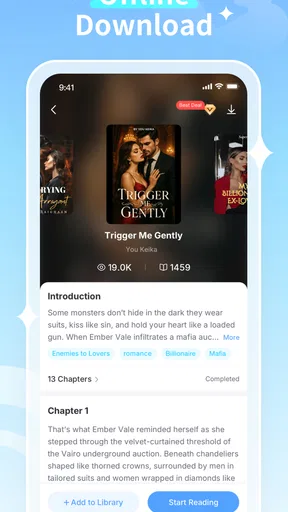
Offline reading is handy for a commute or a place with unreliable connectivity, but I’d prepare before leaving: save the story I plan to read while I’m connected and check that it is available before relying on it. That avoids discovering at the bus stop that I have not prepared anything. For writing, I’d also pause before handing over the device and make sure I have finished the current edit or left myself a clear reminder. These simple steps matter more on a shared screen, where the next person may not know what the previous user intended.
Who is likely to enjoy it—and who may not
I’d recommend TaleWave to readers who like browsing fiction, want the option to write and share their own stories, and are comfortable exploring a community as part of the experience. It may suit a teenager with an adult’s guidance, or a household where one person uses it at a time and everyone understands the account and purchase boundaries. The current version is 1.1.9 and it requires Android 7.0 or later, so it is worth checking the device before planning to use it on an older Android phone or tablet.
I’d skip it if you want a tightly managed children’s reading environment, a polished family library with clearly separated profiles, or a guaranteed home for a particular commercial book. I’d also look elsewhere if your main need is serious long-form drafting rather than a place to share stories and take part in reader-writer interaction. Those are not reasons to dismiss the app; they are reasons to match it to the job you actually want done.
Getting Started with TaleWave
First things first, downloading TaleWave is a breeze. Available on both Android and iOS, it had me logged in and ready to go in no time. The interface is pretty intuitive, which means you won’t be spending ages trying to figure out how things work.
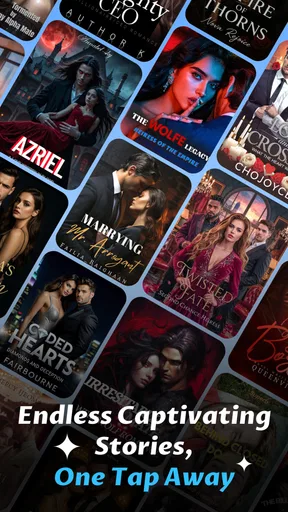
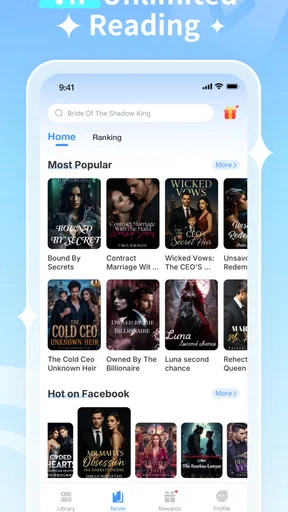
The app opens up with a clean, welcoming homepage that showcases a variety of stories. These range from heartwarming romances to nail-biting thrillers. If you’re anything like me, you’ll find yourself scrolling endlessly, trying to decide which one to dive into first. The app doesn’t just stop at being a reader’s paradise, though. It also caters to those of us who have a story or two bubbling inside.
Discovering New Stories
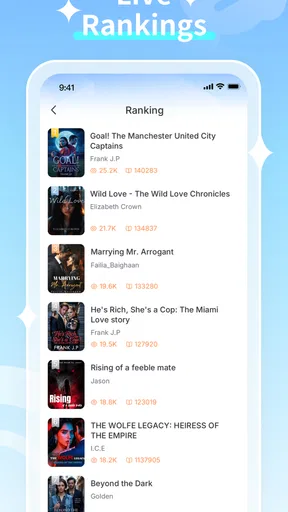
For avid readers, TaleWave is like a treasure trove. The app’s library is vast and constantly updated, which means there’s always something new to discover. You can browse through different genres, check out trending stories, or even delve into recommendations based on your reading history. It’s like having a personalized librarian who knows exactly what you’re in the mood for.
One feature I found particularly cool is the option to save stories for offline reading. This means you can keep up with your favorites even when you’re off the grid. Perfect for those long commutes or lazy weekends when you just want to unplug.
Unleash Your Inner Author
Now, for those of us who love writing, TaleWave offers a platform to publish your own stories. The app provides a user-friendly editor that allows you to craft your tale with ease. Whether you’re jotting down a short story or embarking on the next great novel, TaleWave has got you covered.
What’s even better is the supportive community. You can share your work and receive feedback from fellow writers and readers. It’s genuinely motivating to see others engage with your stories, and the constructive criticism can be invaluable.
Community and Interaction
Speaking of community, TaleWave has built a vibrant space for interaction. There are forums and discussion boards where you can participate in writing challenges or simply chat about your favorite books and authors. It’s a great way to connect with like-minded individuals who share your passion for storytelling.
Plus, the app hosts regular events and competitions. I’ve seen some pretty amazing stories come out of these, and they offer a great opportunity to get your work noticed. It’s a fun way to push your creative boundaries and maybe even win some cool prizes.
Final Thoughts
All in all, TaleWave is a delightful app for anyone who loves stories, whether reading them or writing them. Its seamless blend of reading and writing features, coupled with a thriving community, makes it stand out in the realm of literary apps.
So, if you’re on the hunt for a platform that fuels your love for storytelling, give TaleWave a whirl. Trust me, once you start exploring its depths, you might find it hard to put down. Whether you’re looking to discover new worlds or create your own, this app has something for everyone.
Verdict
Strengths of TaleWave
- Intuitive user interface for easy navigation.
- Extensive library of interactive stories.
- Regular updates with new content.
- Supports offline reading mode.
- Engaging visuals enhance storytelling.
Limitations of TaleWave
- Requires large storage space on device.
- In-app purchases can be frequent.
- Some stories may lack depth.
- Limited customization for characters.
- Occasional minor bugs and glitches.
Similar Picks in This Category
View All
Google Play Books & Audiobooks
Google LLC4.7

네이버 - NAVER
NAVER Corp.3.5

Wattpad - Read & Write Stories
Wattpad.com3.7

King James Bible - Verse+Audio
Ozion4.8

Bible Offline-KJV Holy Bible
Bíblia Offline4.9

Amazon Kindle: Reading App
Amazon Mobile LLC4.8
Frequently Asked Questions
What is TaleWave and how does it work?
TaleWave is an interactive storytelling app that allows users to create and share their own stories. By providing a platform for choosing different story paths, users can engage with narratives in a dynamic way. Whether you enjoy fantasy, adventure, or romance, TaleWave offers a variety of genres to explore.
Is TaleWave free to use, or does it have in-app purchases?
TaleWave is free to download and offers a selection of free stories to enjoy. However, it also includes in-app purchases for premium content, additional story paths, or exclusive features. These purchases enhance the experience but are not necessary for basic use.
Can I create my own stories on TaleWave?
Yes, TaleWave allows users to create their own stories. The app provides tools for writing, editing, and sharing your narratives with the community. You can choose different paths, add multimedia elements, and publish your work for others to enjoy and interact with.
What age group is TaleWave suitable for?
TaleWave is designed for a broad audience, including teenagers and adults who enjoy creative writing and interactive storytelling. While it features content suitable for younger users, parental guidance is recommended to ensure appropriate story choices based on individual maturity levels.
Does TaleWave require an internet connection to function?
TaleWave can be used offline for reading and writing stories saved on your device. However, an internet connection is required to download new content, publish your stories, and interact with the community. Offline mode is convenient for uninterrupted reading on the go.
